Invoices, receipts, bank statements — reviewed by you, posted to QuickBooks correctly.

AxLiner extracts every document type you receive in one mixed batch, shows you the data to verify before anything touches your books, and handles the messy ones — handwritten notes, WhatsApp photos, scanned receipts.

Start free
User 1User 2User 3User 4User 5

5,000+

bookkeepers & accountants

AxLiner document conversion illustration
Company 1
Company 2
Company 3
Company 4
Company 5
Company 6
Company 7
Company 8
Company 9
Company 1
Company 2
Company 3
Company 4
Company 5
Company 6
Company 7
Company 8
Company 9
Company 1
Company 2
Company 3
Company 4
Company 5
Company 6
Company 7
Company 8
Company 9
Company 1
Company 2
Company 3
Company 4
Company 5
Company 6
Company 7
Company 8
Company 9
Company 1
Company 2
Company 3
Company 4
Company 5
Company 6
Company 7
Company 8
Company 9
Company 1
Company 2
Company 3
Company 4
Company 5
Company 6
Company 7
Company 8
Company 9
Company 1
Company 2
Company 3
Company 4
Company 5
Company 6
Company 7
Company 8
Company 9
Company 1
Company 2
Company 3
Company 4
Company 5
Company 6
Company 7
Company 8
Company 9
Company 1
Company 2
Company 3
Company 4
Company 5
Company 6
Company 7
Company 8
Company 9
Company 1
Company 2
Company 3
Company 4
Company 5
Company 6
Company 7
Company 8
Company 9

Throw us the whole folder.

Invoices, receipts, bank statements — drop them all at once. AxLiner classifies each file automatically and extracts on the right schema. No sorting, no separate uploads.

See how it works →

Auto-detect: 40 mixed files classified in one batch

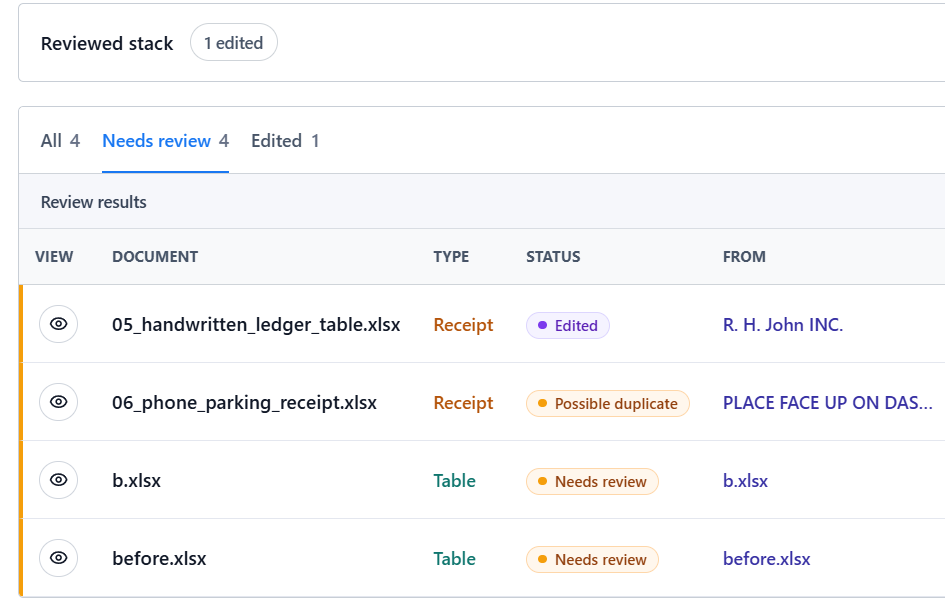
Review board: source document side-by-side with extracted data

See everything before it touches QuickBooks.

Every extracted document lands in your review board before export. Original image on the left, editable cells on the right. Click to correct, tab to move on.

Explore the review board →

The messy stuff. WhatsApp photos. Handwritten receipts.

Other tools claim accuracy on clean PDFs. AxLiner was built for the document your client photographed in bad light and sent over WhatsApp. Per-field confidence flags tell you exactly which cells to check.

Try with a handwritten document →

Handwritten receipt → structured spreadsheet with confidence flags

AP queue: code, review, and publish bills to QuickBooks in one screen

Reviewed, coded, posted — without copy-pasting.

Connect your QuickBooks Online company. Code invoices with vendor, account, and tax. Publish a draft Bill with the original document attached. If anything fails, retry without creating a duplicate.

Start free →

Works for anyone who touches documents.

From solo bookkeepers to construction managers — one workflow, every document type.

Accounting

Automate the most time-consuming parts of accounting workflows. Extract clean spreadsheet data from receipts, invoices, bank statements, and expense reports so teams can reduce manual entry and focus on review.

Discover

Banking

Modernize document-heavy financial operations with structured extraction for checks, loan applications, statements, onboarding packets, and KYC documents while keeping every row ready for downstream review.

Discover

Backoffice Automation

Remove repetitive data entry from internal operations. Turn invoices, forms, receipts, and handwritten tables into usable Excel files that can feed finance, admin, and operations workflows.

Discover

Construction

Convert site notes, delivery forms, checklists, material logs, and handwritten field tables into clean spreadsheets so project teams can keep records current without retyping paperwork.

Discover

CPG Brands

Process retail forms, inventory sheets, distributor paperwork, purchase records, and field reports into structured data that merchandising and operations teams can compare quickly.

Discover

FinTech

Build document intake flows for financial products without asking users or operators to key in every table manually. Extract page-level data into spreadsheets that are easy to validate.

Discover

Healthcare

Digitize handwritten logs, intake forms, lab sheets, inventory notes, and administrative records while preserving the table structure needed for review, reporting, and internal handoff.

Discover

Real Estate

Turn lease packets, inspection forms, closing checklists, rent rolls, and property records into organized spreadsheets for brokers, managers, and operations teams.

Discover

Security

Your data never leaves the review board uninvited.

Secure digital document processing

Documents are processed and deleted after export. No training on your data, no persistent storage beyond your retention window, no third-party sharing. Built around GDPR, SOC 2, and HIPAA-conscious workflows from day one.

ISO 27001-aligned security controls
Built for GDPR, SOC 2, CCPA and HIPAA-conscious workflows
Secure infrastructure across Supabase, Fly.io and Vercel
More Information

FAQ

Questions we hear from bookkeepers.

Can I convert PDFs and images in the same batch?

Yes. PDFs are prepared page by page for processing, while images are handled directly. The final result keeps the batch together so you can download the generated outputs from one job.

When are credits used?

Credits are reserved when a job starts and settled against successful outputs. Failed, skipped, or cancelled images should not be charged as completed work.

How long are result files available?

Generated files are kept for a limited retention window so users can download or share results after processing. For long-term storage, keep the downloaded Excel or text file in your own workspace.

Is anonymous conversion limited?

Yes. Anonymous use is intentionally limited. Creating an account gives the app a real owner for jobs, downloads, billing, history, and recovery after reloads.

What happens if a large batch is interrupted?

Active jobs are tracked by the backend. If the browser reloads or the connection drops, the app can recover recent job state from durable metadata instead of relying only on the open tab.

Start free today

Take back control of your document workflow.

Invoices, receipts, bank statements, handwritten notes — reviewed by you, posted correctly. No per-client minimums, no surprise pricing.

No credit card · 50 free conversions · Cancel anytime